Privacy and Security Review of Browser-Only Repository Analysis
A factual review of browser-only repository analysis across public, private, and local modes, with focus on token scope, vendored dependencies, scanner limits, dynamic import blind spots, and a safe trial plan.
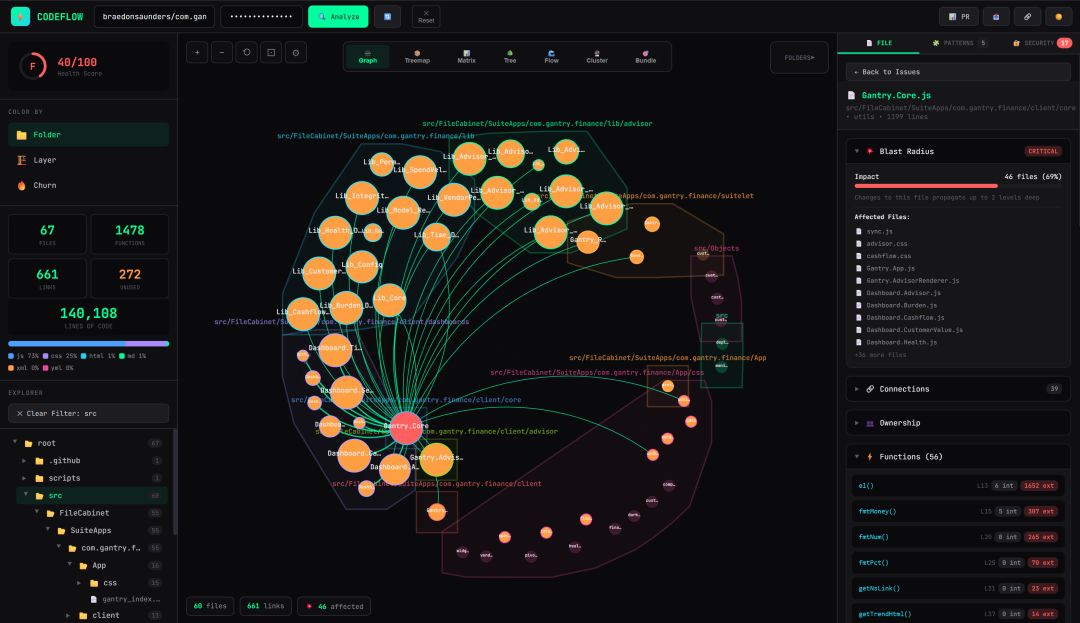
Browser-only repository analysis has become attractive for one simple reason: it keeps code inside the browser and avoids moving source into a third-party desktop app or a remote SaaS backend. That promise sounds straightforward, but the privacy and security story depends on how the product handles repository access, temporary caches, dependency inspection, token scope, and the limits of static scanning. A browser boundary can reduce some risks and amplify others. The right review starts by separating what is actually analyzed from what is merely rendered on screen.
This article reviews browser-only repository analysis through three operating modes: public, private, and local. It also examines tokens, checked-in vendor dependencies, security scanner blind spots, dynamic import blind spots, and a safe trial plan. The goal is not to label every browser-based tool as safe or unsafe. The goal is to identify the concrete questions that determine whether a workflow is acceptable for public code, sensitive internal code, or regulated repositories that cannot leave a controlled environment.
What browser-only analysis usually means
In a browser-only model, the user opens a repository in a web interface and the analysis engine runs in the browser or in a nearby service with limited server-side processing. The product may fetch files from a remote origin, parse the tree, visualize dependencies, search for secrets, and build summaries from code structure. Some products keep all source material on the client after the initial fetch. Others stream selected files from a server, cache results in local storage, or use a small backend for indexing and authentication.
The phrase itself does not guarantee privacy. A browser app can still send file contents, metadata, usage logs, and tokens to a server. A local-first implementation can still be risky if it loads remote scripts, posts telemetry, or uses third-party APIs for enrichment. In other words, the browser is not a security boundary by itself. The real boundaries are data flow, trust, and retention.
Public mode
Public mode is the easiest case, but it is not the same as risk-free. If the repository is already public, the obvious confidentiality concern is lower. Even so, the browser analysis tool can create new privacy exposure by collecting analytics, storing access tokens, or revealing usage patterns. A public repository can still be commercially sensitive if the analysis reveals who is reviewing it, what branches are being checked, or which issues are being investigated.
Public mode is most defensible when the tool does all of the following: fetches only public content, avoids asking for unnecessary credentials, uses read-only access when authentication is needed, and keeps telemetry minimal. The user should still ask whether the tool stores a server-side copy of the repository, whether it retains query history, and whether search indexes persist after the session ends. A public repository may not require secrecy, but user behavior around that repository may still be sensitive.
For compliance-oriented teams, public mode should also be reviewed for provenance. If the system enriches code with package metadata, commit history, or external vulnerability feeds, it may make outbound requests to services beyond the repository host. Those calls can expose repository names, dependency graphs, or topic keywords. The security posture depends not just on source visibility, but on whether the browser app is quietly building a broader profile of the project.
Private mode
Private repositories change the analysis substantially. In this mode, the critical question is whether the tool can access code without broad, persistent, or over-scoped credentials. Many privacy failures come from convenience features that feel harmless during setup: a personal access token with full repository scope, OAuth consent that includes unrelated resources, or a session token reused across projects. A browser-only analysis product should minimize the lifetime and scope of any secret used to fetch private source.
Ideally, the product should support least-privilege access. Read-only access is often enough. Project-specific installation tokens are better than account-wide credentials. Short-lived credentials are better than long-lived ones. If a tool needs to inspect multiple repositories, the user should be able to narrow the grant to a single organization or repository. The fewer capabilities a token has, the less damage is possible if it is exposed in logs, screenshots, browser storage, or crash reports.
Private mode also introduces retention questions. Does the browser cache code in local storage or IndexedDB? Does the backend retain file snapshots? Are derived artifacts such as embeddings, summaries, dependency maps, or token-matching results stored beyond the session? Derived artifacts can leak as much as the source itself, because they may reconstruct structure, names, and security-sensitive paths. A tool can be privacy-preserving in the narrow sense of avoiding source upload, yet still retain enough metadata to create meaningful exposure.
Another issue is personnel access. If a private repository is processed by a service operator, even transiently, the organization needs to know whether employees or contractors can inspect logs, debug dumps, or support traces. A browser-only system sometimes gets treated as if it were invisible to the provider, but any remote indexer, auth server, or metrics endpoint can become a secondary disclosure channel.
Local mode
Local mode is the strongest privacy posture, but only if it is genuinely local. That means the repository stays on the user device or on an approved internal machine, the analysis runs without external upload, and the tool avoids remote script execution or hidden cloud dependencies. A local mode can be excellent for regulated codebases, air-gapped environments, and teams that need to avoid data movement altogether.
The security review for local mode shifts from data exposure to software supply chain and execution risk. A local browser app may still require a companion service, a package manager install, or a desktop bridge. If that support stack downloads models, fetches dependency manifests, or contacts update servers, the local guarantee weakens. Users should distinguish between local storage and local processing. Storing files locally is not enough if sensitive content is sent elsewhere for analysis.
Local mode is also where trust in bundled third-party code becomes central. If the application ships vendor dependencies inside the repository or as packaged assets, those files may execute in the browser with the same privilege as first-party code. That can be useful for performance and offline operation, but it also means the security of the app is only as strong as the full dependency tree. Local mode reduces network exposure; it does not remove supply chain risk.
Tokens and secret handling
Tokens are the most obvious place where privacy and security intersect. A repository-analysis workflow may need tokens for source hosting APIs, package registries, private mirrors, or scanner backends. The first rule is to understand where each token exists. Is it entered into the browser, stored in a session cookie, placed in local storage, cached in memory, or passed to a remote service? The second rule is to understand what each token can access. A token with broad scope can become a cross-project liability even if the app never intends to misuse it.
A safe design keeps tokens out of long-lived browser storage whenever possible, uses secure transport, and redacts them from logs. If a token must be persisted, the product should say so plainly and explain the protection model. Ephemeral in-memory handling is preferable to permanent browser storage, but even memory can leak through crash dumps, extensions, or shared screen capture. Any app that encourages pasting access tokens into a browser field should assume those tokens deserve the same operational discipline as passwords.
There is also a subtle review question: does the product ask for tokens that are not necessary for the task? A security scanner that only needs repository read access should not ask for package publishing rights. A dependency viewer should not request admin-level GitHub scopes. Over-collection is a privacy problem even when no breach occurs, because it expands the harm of a future compromise.
Checked-in vendor dependencies
Checked-in vendor dependencies deserve special attention in browser-only analysis because they often create a false sense of transparency. Seeing the source tree in the browser can make the project appear auditable, yet a large portion of the effective code may live in vendored bundles, generated files, minified assets, or third-party packages. These dependencies can import their own transitive code, execute on page load, or pull in browser-specific shims that the main repository maintainers did not review closely.
From a privacy standpoint, checked-in vendor files can contain unexpected data paths. They may include telemetry hooks, update pings, or environment probes. From a security standpoint, they can hide vulnerable or outdated code because the source file being scanned is not the one that ultimately executes. If the browser analysis tool only examines first-party files, it may miss the risk sitting in the vendored layer. If it does inspect vendor code, the user still needs to know whether the scan understands generated assets or merely treats them as opaque text.
Teams should therefore treat checked-in dependencies as a review boundary, not a shortcut. The relevant questions are: which dependencies are vendored, why they are vendored, how often they are updated, and whether the tool exposes their origin clearly. A browser interface that collapses dependencies into a single flattened tree can make it easier to browse, but harder to see where third-party responsibility begins and ends.
Security scanner limits
Security scanners are essential, but they are never complete. Static analysis is best at known patterns and best-effort heuristics. It is weaker against complex control flow, runtime composition, generated code, unusual framework conventions, and repo-specific build logic. Browser-only analysis often relies on parsers or lightweight scanners that are excellent for quick feedback and poor at full semantic understanding.
The limits matter because users may infer a false negative means no issue exists. That is not a safe conclusion. A scanner can miss secrets that are split across files, assembled at runtime, hidden in comments, loaded from environment variables, or stored in nonstandard file types. It can also miss logic that is only dangerous after compilation or bundling. The result is a useful signal, not a proof of absence.
Another limit is context. Scanners can usually identify suspicious strings, insecure imports, or known vulnerable package versions. They are weaker at judging whether a dependency is actually reachable in the deployed environment. A package may appear in the lockfile and never be shipped. Another may be bundled only in a test path. Browser-only tools that do not model build and runtime context can over-report some issues while under-reporting others.
Users should also ask what file types the scanner understands. Markdown, YAML, JSON, JavaScript, TypeScript, Python, and manifest files are commonly supported. But shell scripts, configuration templates, generated bundles, lockfiles from multiple ecosystems, and binary artifacts may be partially parsed or ignored. If a product claims comprehensive coverage, the burden is on the vendor to explain how that coverage works and where the blind spots remain.
Dynamic import blind spots
Dynamic imports are a classic blind spot for browser-based repository analysis because they shift dependency resolution from static text to runtime behavior. If a file uses import expressions, computed paths, plugin loaders, conditional requires, or framework-level lazy loading, the analyzer may not know which modules are actually reachable. That uncertainty can hide both security problems and privacy risks.
For security review, a dynamic import can mask an unsafe path that only appears under certain configuration flags or user actions. It can also create a supply chain issue if the runtime chooses modules from a directory that the static scanner does not fully traverse. For privacy review, dynamic imports may load code that performs telemetry, authentication, or remote requests only after a user clicks a feature. The app may look quiet during analysis and noisy in production.
The browser-only limitation is not that dynamic imports are impossible to inspect. The limitation is that the inspection is often conservative. Without executing the application under real scenarios, the tool may not know the full set of possible modules. That means route coverage, bundle analysis, and search-based detection should be treated as complements, not substitutes, for runtime-aware testing. A repository browser can point to suspicious patterns, but it cannot guarantee the absence of a hidden loader branch.
What a careful user should verify
A prudent review of browser-only repository analysis should verify six things before any sensitive code is uploaded or connected. First, understand whether analysis truly stays local or whether source is transmitted to a service. Second, confirm the smallest possible token scope. Third, inspect whether the product retains snapshots, embeddings, logs, or query history. Fourth, check whether vendor dependencies are scanned as first-class code or ignored as opaque blobs. Fifth, identify the scanner's supported languages and file types. Sixth, test whether dynamic imports, generated files, and build-time indirections are represented honestly in the results.
These checks are practical because they align with actual risk. They do not require faith in marketing claims. They require a conversation about data flow, retention, and coverage. If the vendor cannot answer those questions clearly, the safest assumption is that the tool is optimized for convenience first and assurance second.
Safe trial plan
A safe trial should be staged and intentionally boring. Begin with a public repository that contains no credentials, no private business logic, and no production secrets. Use it to observe how the browser app authenticates, what metadata it requests, and whether it emits any unexpected network traffic. Watch the developer console and network panel for calls beyond the expected repository host and any clearly disclosed service endpoints.
Next, trial a private repository only after creating a dedicated least-privilege token. Use a repository-specific read-only grant if the platform supports it. Do not reuse a personal token that already has broad permissions elsewhere. If the application requires OAuth, review the consent screen carefully and deny any unrelated scopes. During the trial, check whether the tool caches files in browser storage after logout and whether clearing the session actually removes the working data.
Before expanding to a sensitive codebase, introduce a synthetic repository. Populate it with harmless files that mimic the structure of your real project: a lockfile, a few vendored dependencies, a dynamic import path, a secret-like placeholder string, and a small test suite. This gives you a controlled way to see how the scanner behaves without exposing real code. If the tool misses the dynamic import or the vendored dependency path in the synthetic repo, do not assume it will do better on production code.
The final stage is local mode, if available. Run the tool offline or behind a controlled proxy, then compare its claims against your expectations. Confirm that no remote uploads occur, that update checks are documented, and that any model or rule downloads are explicit. If the product cannot function offline without silently reaching external services, then it is not truly local and should be treated accordingly.
Decision criteria
Browser-only repository analysis is a good fit when the code is public, the workflow is exploratory, and the user wants fast feedback with minimal installation overhead. It is a more cautious fit when the repository is private but the team can enforce least-privilege access, short retention, and clear data boundaries. It is the weakest fit for code that must never leave a controlled environment unless the product can demonstrate true local execution and minimal external dependency.
The most important decision criterion is not whether the app runs in a browser. It is whether the app respects the security properties the repository needs. If it leaks tokens, over-collects telemetry, hides vendor bundles, or overstates static scanner coverage, the browser interface is a liability. If it keeps source local, scopes credentials tightly, reveals its limits, and makes retention explicit, it can be a useful and reasonably safe layer for code review.
Bottom line
A browser-only repository analyzer can be privacy-preserving, but only under disciplined assumptions. Public mode is about minimizing metadata and avoiding unnecessary telemetry. Private mode is about tight credential scope, clear retention limits, and honest disclosure of what leaves the machine. Local mode is about proving that the tool truly stays local and does not quietly depend on cloud services. Across all modes, the major blind spots are tokens, checked-in vendor code, scanner incompleteness, and dynamic import behavior. A safe trial plan starts with harmless code, uses least privilege, watches network activity, and validates the tool against a synthetic repository before any sensitive code is involved.